
AxisCare Mobile
AxisCareBusiness
4.82.55K Reviews
- Version
- 3.49.0
- Installs
- 500.00K
- Age Rating
- Everyone
Screenshots

Our Review of AxisCare Mobile
 Analysis by Appyee
When a care business needs staff to stay aligned while they are away from a desk, a mobile companion can make the difference between a smooth day and a chain of phone calls. I spent time looking at AxisCare Mobile from that practical angle: not as a general business organizer, but as a focused tool for caregivers and administrators already working within the AxisCare environment. My impression is that its value comes from keeping mobile work close to the scheduling and care operation, rather than trying to become an all-purpose office suite.
That distinction matters. A caregiver usually needs quick access to the information connected with the day’s work, while an administrator needs a dependable way to keep field activity connected with office coordination. AxisCare Mobile is best understood as a work companion for home-care teams, not as a standalone app that will be equally useful to every small business or independent professional.
How the everyday workflow feels
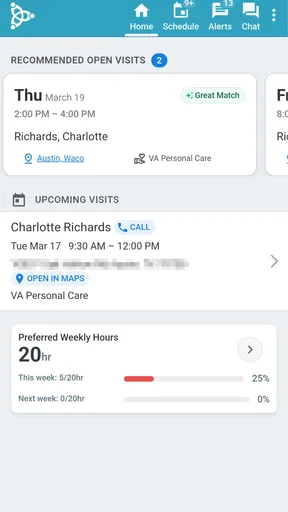
The most sensible starting point is the basic routine: open the app before heading to an appointment, check the work assigned for the day, use the relevant client or visit information while carrying out the task, and update the record afterward. That sounds simple, but simplicity is important in care work. A mobile workflow has to fit between travel, conversations, personal support and unexpected changes. If it demands repeated office-style administration, it loses much of its purpose.
In my view, AxisCare Mobile makes the most sense when the organization has already established AxisCare as its central system. The app then becomes the field-facing part of that arrangement. Caregivers can work from the phone instead of relying on printed schedules or waiting for an administrator to relay every update. Administrators, meanwhile, have a mobile route into the same operational environment rather than having to treat the office and the field as separate worlds.
A realistic example would be a caregiver beginning a busy morning with several visits. Instead of keeping a handwritten list and calling the office whenever a detail changes, the caregiver can use the mobile app as the reference point for the assigned work. After a visit, the useful habit is to complete the relevant update while the details are still fresh, rather than postponing everything until the end of the shift. That reduces the risk of mixing up times, clients or observations later.
This is also where the app’s limits become clear. It cannot solve an organization’s scheduling confusion by itself. If office staff do not maintain accurate assignments or if the team has not agreed on when updates should be entered, the phone app will simply expose those process problems. I would therefore treat it as part of a shared operating routine, not as a magic replacement for communication and training.
For administrators, the appeal is different. A mobile interface can be useful when they are moving between locations, checking on coverage or handling a question away from a computer. It is not necessarily a replacement for every desktop task, especially when a large amount of planning or record management is involved. The strongest arrangement is usually a division of labor: the desktop environment for broad administration and the mobile app for timely field access and updates.
One practical tip is to make the first minute of every shift consistent. I would check the day’s assignments, look for anything that appears unusual, and confirm that the information needed for the next visit is available before leaving. That habit is more valuable than repeatedly exploring the interface. It creates a predictable checkpoint and gives the office a chance to correct a problem before it becomes a missed or delayed visit.
What caregivers should expect from the mobile side
Caregivers should expect a work-focused experience rather than a personal productivity app. The point is to support duties connected with care visits and the organization’s administration. That makes it more relevant than a generic calendar when the employer already uses AxisCare, because a normal calendar can show an appointment but does not necessarily connect the appointment with the wider care workflow.
At the same time, I would not recommend assuming that every caregiver will enjoy the app immediately. People who are uncomfortable entering information on a phone may need a short orientation and a clear explanation of which updates are expected. The best training is task-based: show how to begin the day, find the relevant visit information, finish the required update and recognize when to contact the office instead of guessing.
Another useful habit is to separate information that belongs in the app from information that belongs in a direct conversation. Routine work updates should follow the organization’s established process. Urgent concerns, ambiguous instructions or situations involving immediate safety should not be delayed while someone tries to find the perfect screen. A mobile system supports communication; it does not remove professional judgment.
Settings and preparation that deserve attention
There is no benefit in treating settings as decoration. Before relying on the app during a full day, I would review the phone’s basic conditions: keep the operating system compatible, make sure the device is signed into the correct work account, and check that the app is ready before leaving a reliable connection. AxisCare Mobile supports devices running iOS 9 or later, which gives it a broad compatibility range, but an older supported system does not automatically mean an old phone will feel comfortable for daily work.
I would also pay attention to the phone itself. A caregiver who uses a small screen, a worn battery or unreliable mobile service may experience more friction than someone with a newer device, even when the app is functioning normally. Keeping the phone charged before a shift and carrying a practical backup plan for communication is sensible field preparation. This is not a special feature of the app; it is the difference between a mobile workflow that is dependable and one that becomes stressful halfway through the day.
Notifications are another area worth checking with the organization’s policy in mind. If the app presents work-related alerts, the user should decide how those alerts fit into the working day without allowing them to become distracting during a visit. I prefer a clear routine: review relevant updates at planned moments, then focus on the person receiving care. Constantly looking at the phone can undermine the very service the app is meant to support.
Privacy also deserves a deliberate approach. A phone used for care work should be protected with the device’s normal security controls, and users should avoid leaving work information visible when the phone is unattended. I would not share a work device casually or leave the app open in a public place. These are straightforward habits, but they matter more in a care setting than they do in a basic shopping or note-taking app.
Organizations should decide in advance what happens when a phone is lost, replaced or shared. The app is easier to use when the employer has a simple process for removing access, helping with a new device and answering account questions. That preparation is especially important for teams with many caregivers, because a small amount of confusion repeated across the workforce quickly becomes an administrative burden.
Patterns that make repeated work quicker
Experienced users usually gain speed through consistency rather than secret tricks. With this app, I would build a repeatable sequence around the workday: check assignments in the same order, open the information needed for the next task before starting it, record updates promptly, and review the next appointment before moving on. The advantage is not only speed. A fixed sequence makes omissions easier to notice.
For a caregiver, the most useful “shortcut” may simply be reducing unnecessary movement through the app. If the next task is predictable, finish the current visit’s documentation before switching context. Avoid leaving several incomplete updates open in your memory. That approach is particularly helpful on demanding days, when interruptions make it easy to believe a detail will be remembered later.
Administrators can use a similar pattern from the opposite direction. When responding to a field question, first establish whether the issue concerns the assignment, the visit information or a broader scheduling decision. That small classification helps prevent the mobile app from becoming a place where every problem is handled in an improvised way. The app can support a quick answer, but the organization still needs a consistent rule for who changes what and when.
A useful team practice is to agree on a short escalation language. For example, staff can distinguish between a routine update, a scheduling conflict and an urgent care concern. The exact wording should come from the employer, but the principle is valuable: use the app for the information it is designed to carry, and use direct contact when a situation needs immediate human attention. This reduces the temptation to bury an important issue inside an ordinary update.
I would also encourage supervisors to observe where staff hesitate. If several people repeatedly ask how to find the same item or when to enter the same kind of update, the problem may be training rather than app performance. A short team demonstration can be more effective than sending a long manual. It also gives the organization a chance to simplify its own procedures instead of expecting the mobile interface to compensate for unclear instructions.
Where the app is strong, and where it reaches its limits
The clearest strength is focus. AxisCare Mobile is made by AxisCare and is aimed at the mobile needs of caregivers and administrators. That makes it more appropriate for an AxisCare-based care operation than a generic task manager, shared calendar or messaging app used as a patchwork system. A generic alternative may be easier to adopt for a very small team, but it usually requires more manual coordination and offers less connection to the organization’s established care-management process.
Its other advantage is accessibility for a broad workforce. The app is free to download, carries an Everyone age rating and has been available since May 11, 2016. Those details do not guarantee that it will suit every organization, but they point to a mature, broadly approachable mobile product rather than a niche tool designed only for technical users.
Public reception is also encouraging: it holds a 4.8 average from around 21 thousand ratings, with roughly 2.6 thousand written reviews, and has passed 500 thousand installs. I see that as a useful signal of adoption, not proof that every team will have the same experience. Individual satisfaction will depend heavily on the employer’s AxisCare setup, the quality of the schedule and the clarity of the team’s procedures.
The current version is 3.49.0, so users should keep the app maintained rather than treating an old installation as a permanent snapshot. Updates can affect compatibility and day-to-day behavior, and a business should avoid discovering that issue during a busy shift. I would have staff update during a planned maintenance window and then perform a quick check of the normal workflow before relying on the app in the field.
The main trade-off is specialization. Someone looking for a general calendar, personal reminder tool, independent invoicing app or broad project-management platform may find AxisCare Mobile too narrow. An independent caregiver who does not work within an AxisCare organization is also unlikely to get the same value from it. In those cases, a general business app may be a better fit because it starts with the user’s own workflow rather than an agency’s care-management system.
There is also a human limitation: mobile access can encourage organizations to expect instant responses at all times. That is a management problem, but it affects the app experience directly. A good implementation should define working hours, response expectations and emergency procedures separately from routine mobile updates. Without those boundaries, convenience can turn into pressure for caregivers and administrators.
Who should use it and who should look elsewhere
I would recommend AxisCare Mobile to caregivers whose agencies already rely on AxisCare and want a practical way to stay connected while away from the office. It is also a sensible choice for administrators who need mobile visibility into their operation without pretending that a phone is identical to a full desktop workspace. Teams with many field workers can benefit most when everyone follows the same update habits.
I would be more cautious for a business still choosing its core care-management system. The mobile app should not be evaluated in isolation. The important question is whether the wider AxisCare workflow matches the organization’s scheduling, documentation and administrative needs. If the underlying system is not the right fit, a useful mobile companion will not solve that larger mismatch.
It is also not the right choice for people seeking a flexible personal organizer. The app’s purpose is tied to professional care operations, so using it for unrelated reminders or general business planning would miss its strongest qualities. A lighter calendar or task app may be more comfortable for a solo professional with no need for agency coordination.
My verdict after looking at the complete workflow
AxisCare Mobile earns its place by connecting field work with the AxisCare environment in a way that feels more purposeful than juggling paper notes, calls and a generic calendar. I like it most when it is paired with simple habits: check the day before leaving, keep updates timely, protect the phone, and know when an issue requires direct contact with the office.
Its success depends less on flashy extras than on disciplined use. Caregivers need clear expectations, administrators need reliable underlying information, and the organization needs to respect the difference between routine updates and urgent communication. When those pieces are in place, the app can reduce avoidable back-and-forth and give mobile staff a more dependable reference during the day.
My final recommendation is therefore specific rather than universal: choose AxisCare Mobile if your care team already works with AxisCare and needs a focused mobile workflow. I would skip it as a standalone download for general business tasks, and I would compare broader alternatives if your organization has not settled on its main care-management platform. For the audience it is built around, though, it is a credible, mature and practical tool that rewards repeatable routines more than casual experimentation.
That is the real measure of this app. It will not replace sound scheduling, good supervision or professional judgment. What it can do is keep the right work closer to the people carrying it out, which is exactly where a caregiver-focused business app should prove its worth.
Verdict
Strengths of AxisCare Mobile
- Quick access to client schedules, visit details, and care notes on the go.
- Supports real-time updates between caregivers and office staff.
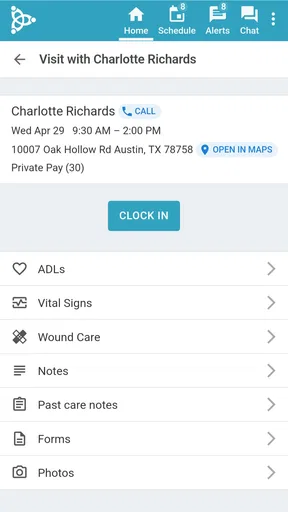
- Makes clock-in, clock-out, and visit verification more convenient.
- Helps organize tasks and reduce reliance on paper records.
- Useful communication tools improve coordination across care teams.
Limitations of AxisCare Mobile
- Requires a stable internet connection for many features and updates.
- Some functions may depend on the agency’s AxisCare configuration.
- Frequent data entry can feel time-consuming during busy visits.
- Battery and mobile data usage may increase during extended shifts.
- New users may need training to navigate the professional workflow.
Similar Picks in This Category
View All
LinkedIn: Community & Network
LinkedIn3.8

Zoom Workplace
zoom.com4.1

Microsoft Teams
Microsoft Corporation4.6

Meta Business Suite
Meta Platforms, Inc.4.6

Webex Meetings
Cisco Systems, Inc.4.5

TeamViewer Remote Control
TeamViewer4.4
Frequently Asked Questions
What is AxisCare Mobile used for?
AxisCare Mobile is a companion app for caregivers and home-care staff who need to manage scheduled visits while working in the field. After signing in through an organization using AxisCare, caregivers can typically review assigned shifts, see client and service information, record visit details, complete required tasks, and submit notes or timesheets. The exact tools available may depend on the agency’s AxisCare setup and the user’s permissions.
Do I need an AxisCare account or an invitation from an agency to use the app?
Yes. AxisCare Mobile is generally intended for employees or contractors working with a home-care agency that uses the AxisCare platform. You normally cannot create a fully independent account and use the app as a standalone scheduling tool. Your agency must provide access, login instructions, and any required verification details. If you cannot sign in, your agency administrator or office manager is usually the correct person to contact.
Can caregivers clock in and out and submit visit notes with AxisCare Mobile?
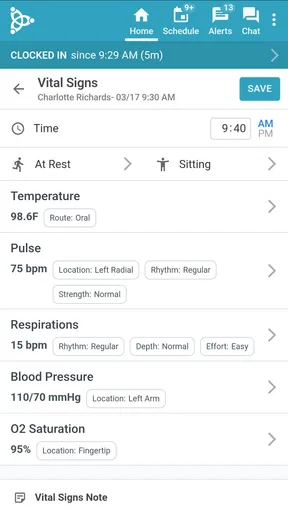
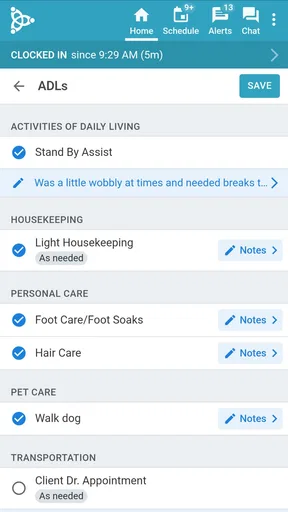
The app is designed to support common field-care documentation, including viewing visits, recording arrival and departure information, completing care-related tasks, and submitting notes. Depending on the agency’s configuration, it may also support electronic visit verification, signatures, mileage, incident reporting, or other forms. Available options can vary by location, account role, and agency policy, so users should confirm the required workflow before relying on the app for payroll or compliance records.
Does AxisCare Mobile work without an internet connection?
Some mobile workflows may continue temporarily when connectivity is limited, but users should not assume that every feature works fully offline. Visit updates, notes, time records, and other information may need to synchronize with the AxisCare system before they are visible to the office. For the most reliable results, open the app before traveling to a client, keep the device connected when possible, and check that pending information has successfully uploaded after the visit.
Is AxisCare Mobile free to download, and is it safe for handling client information?
The app may be available to download without a separate purchase, but access usually depends on an organization’s AxisCare subscription and an authorized user account. Because the app can display sensitive scheduling and client-care information, users should protect their login, use a secure device, install updates, and avoid sharing screenshots or credentials. Privacy and security also depend on the agency’s policies, device settings, permissions, and how staff handle information outside the application.
